On April 29, 2026 Meta gave AI agents an official way into Ads Manager: an MCP server at mcp.facebook.com/ads and the Meta Ads CLI command-line tool. Claude, ChatGPT, Claude Code and Codex can now read account statistics, create and edit campaigns, duplicate ad sets and diagnose the pixel by text command, with no clicking through the interface. For an affiliate this is the first automation tool that does not break Meta's rules, because Meta built it. Here is how it works, how to connect in five steps, which prompts cover a buyer's routine, where the agent is useless and which eight risks it adds to accounts. Facts follow Meta's official announcement and the first guides; the rollout is gradual and some accounts do not have access yet.
What Meta Ads MCP and CLI are
MCP (Model Context Protocol) is an open protocol through which AI agents connect to external services: the agent gets a list of "tools" (create a campaign, show statistics, update a budget) and calls them on your plain-language request. Meta runs an official MCP server for Ads Manager: the agent authorizes via OAuth in Business Manager, no developer app required.
Meta Ads CLI is the same functionality from the terminal: commands like "create a campaign with the leads objective", for scripts and agents such as Claude Code and Codex. It needs a system user in Business Manager with access to the account and an access token.
The key rule Meta states: reading is free, any write requires explicit user confirmation. The agent cannot raise a budget or launch a campaign on its own: it proposes an action, you confirm. This is the safeguard against "optimize while I sleep" and the main difference from unofficial auto-uploaders.
How it works
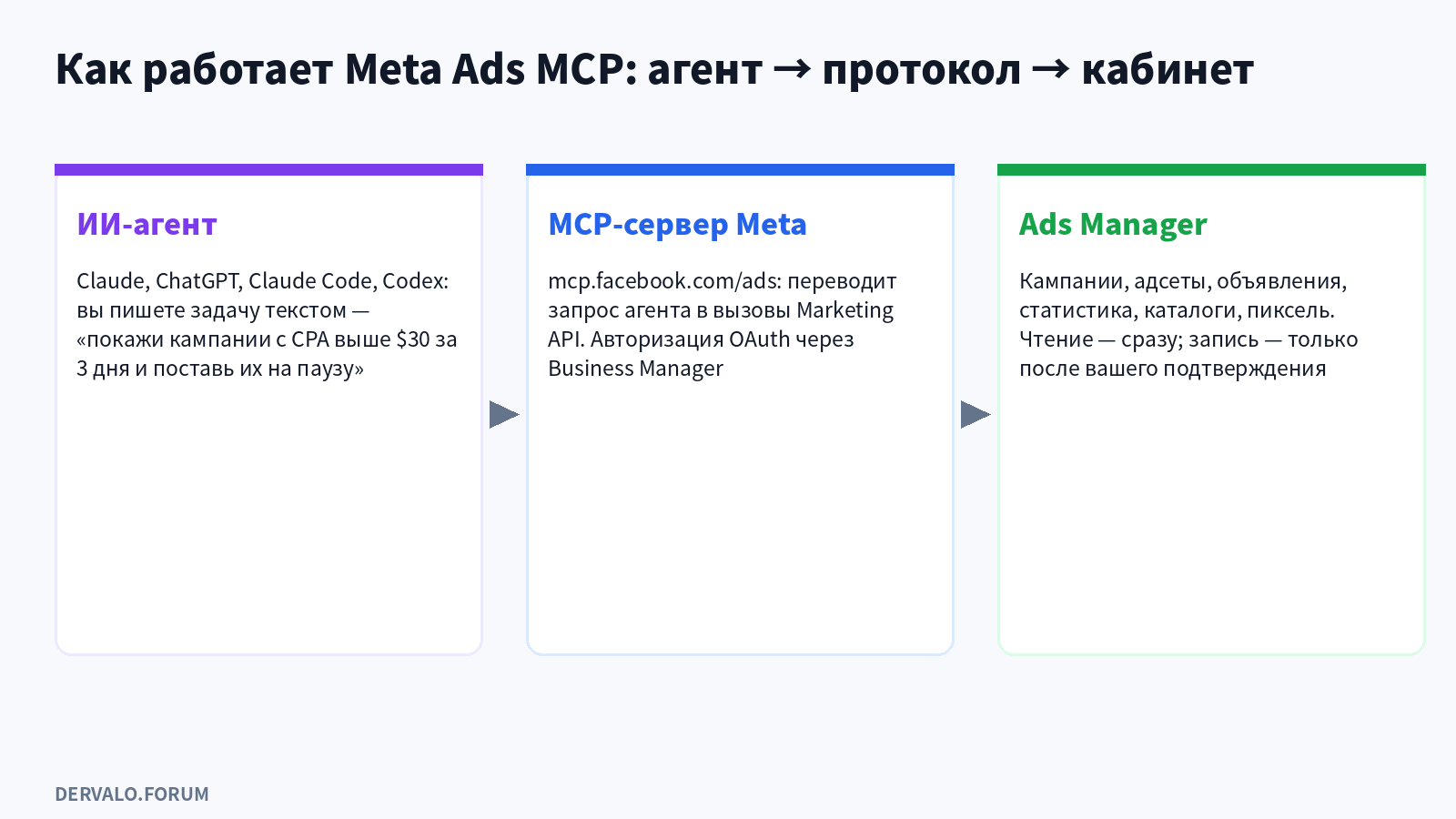
Agent → MCP server → Marketing API → Ads Manager: reads immediately, writes with confirmation (Russian) · click to enlarge
You tell the agent: "show ad sets from the last 3 days with CPA above $30 and suggest which to pause". The agent queries statistics via MCP, calculates, shows a table and a list of actions. You reply "yes, pause the first three"; the agent calls the write tool, Meta asks for confirmation, you confirm, the changes apply. Everything that used to be a spreadsheet export, filters and a dozen clicks is one dialog.
Connecting in 5 steps
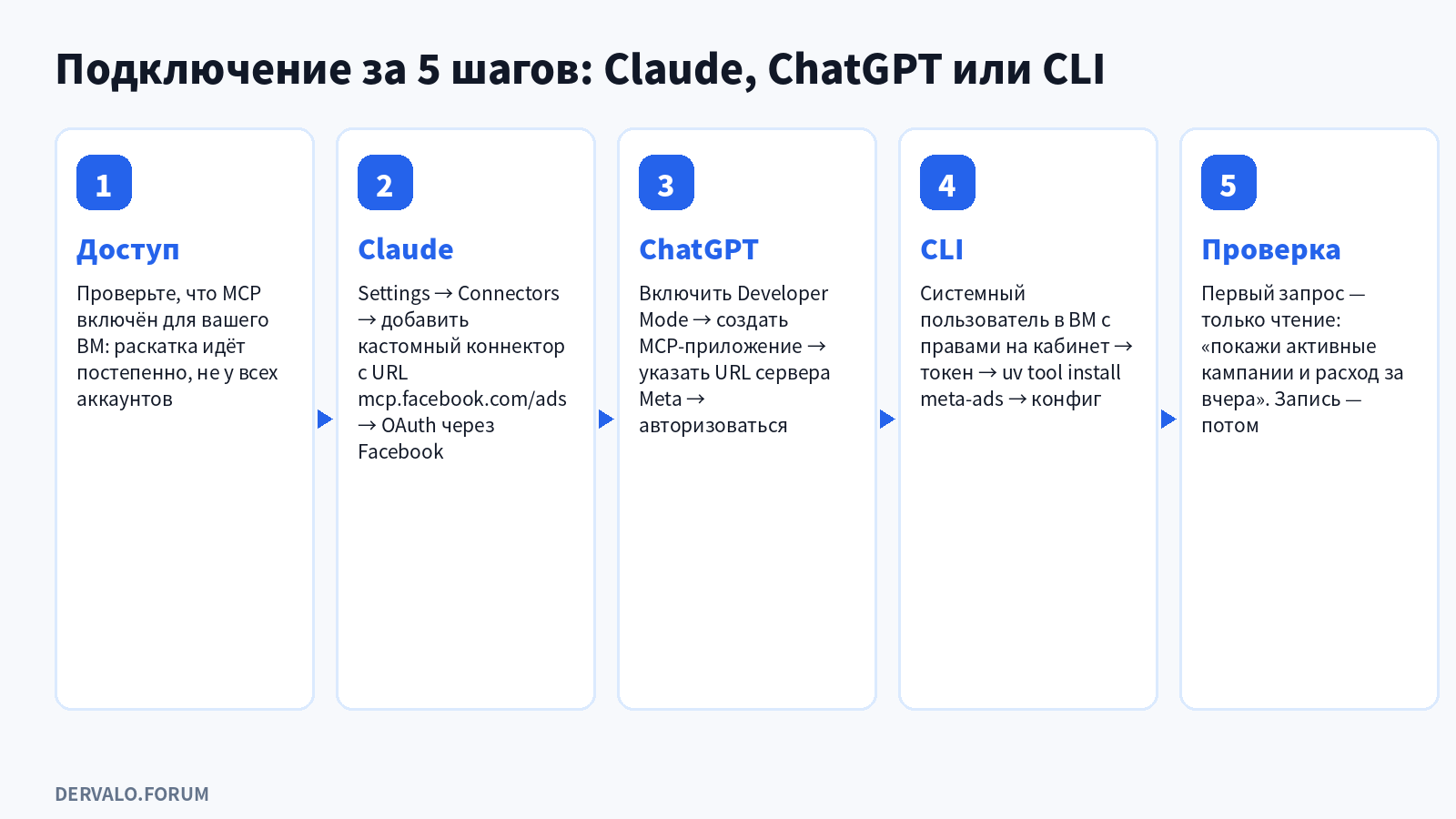
Three paths: a connector in Claude, an MCP app in ChatGPT, CLI for scripts (Russian) · click to enlarge
- Access. The rollout is gradual. According to the first guides, priority goes to verified Business Managers with spend history and US/EU geos; young and CIS accounts get access later. Easy check: try adding the connector; if OAuth does not offer an account to pick, access is not open yet.
- Claude (the simplest path). Settings → Connectors → Add custom connector → URL
https://mcp.facebook.com/ads→ Facebook authorization → choose the Business Manager and accounts. - ChatGPT. Enable Developer Mode in settings → create an MCP app → enter Meta's server URL → authorize.
- CLI. In Business Manager create a system user with access to the needed accounts, generate a token, install the tool (
uv tool install meta-ads), put the token in the config. Then commands from the terminal or via Claude Code / Codex. - Check. First request is read-only: "show active campaigns and yesterday's spend per account". Make sure the agent sees the right accounts, then move on to writes.
What the agent does in the account, and what it does not
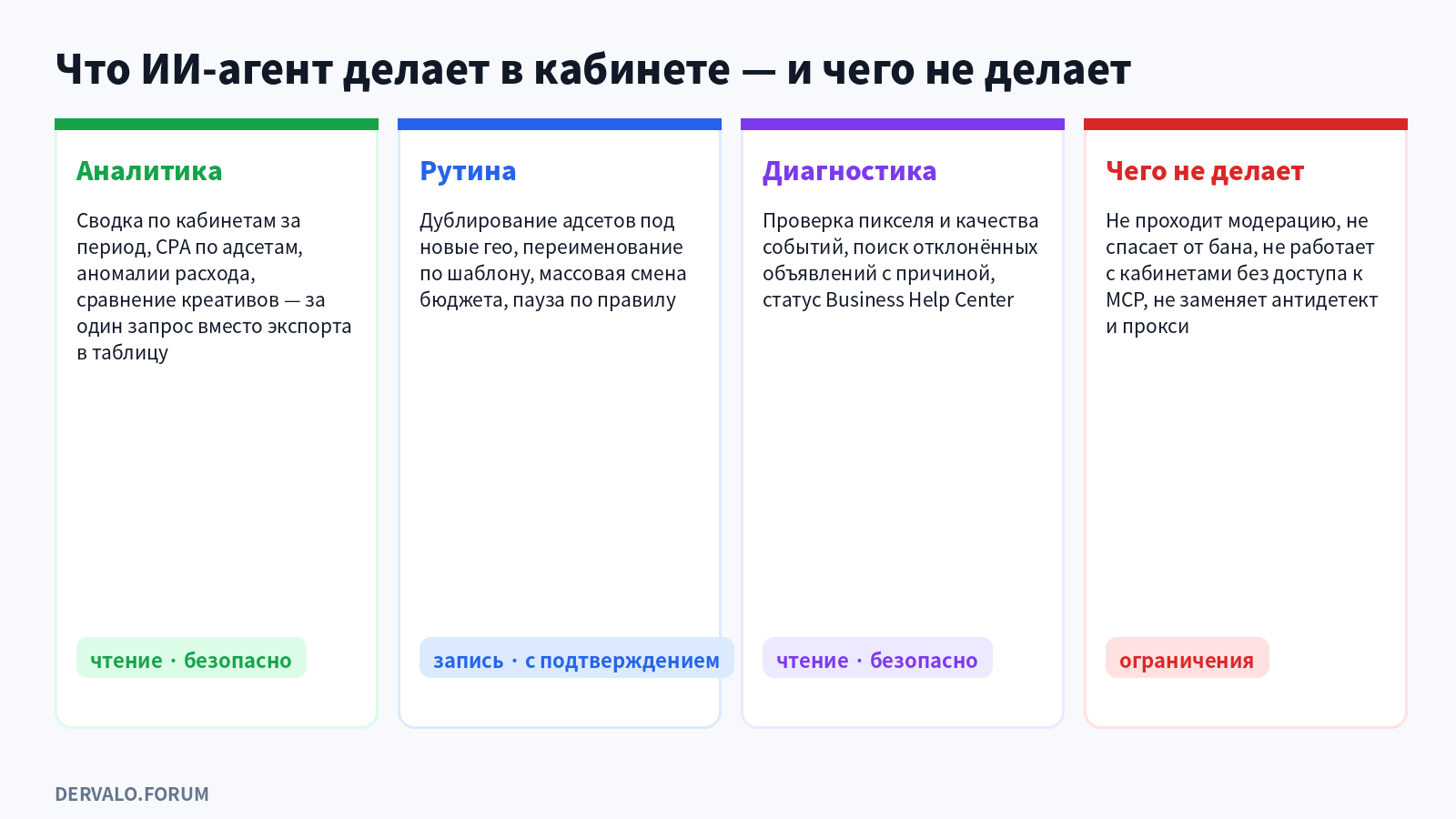
Analytics and diagnostics are risk-free; routine needs confirmation; moderation and bans are out of scope (Russian) · click to enlarge
- Analytics (read). Account summaries, CPA and ROAS by ad set and creative, spend anomalies, period comparison, breakdown by geo and placement. Everything buyers keep spreadsheets and trackers for, in one request.
- Routine (write with confirmation). Duplicating ad sets for new geos, renaming by template, bulk budget changes, pausing by rule, creating campaigns from a description.
- Diagnostics (read). Pixel event quality, rejected ads with reasons, Business Help Center search.
- What it does not do. It does not pass moderation, does not bypass bans or checkpoints, does not work with accounts without MCP access, and does not replace an anti-detect or proxies; the agent acts strictly within Marketing API rules. Bans and appeals are covered in the ad account ban article.
10 prompts for affiliates
Copy and fill in your values. The first five are read-only and safe for any account; the second five write and require confirmation.
Analytics:
1. Show spend, leads and CPA for yesterday and for the last 7 days across all accounts. Highlight accounts where yesterday's CPA is more than 30% above the weekly average.

2. For campaign [name], give a table by ad set: spend, impressions, CTR, CPM, conversions, CPA for the last 3 days. Sort by CPA.

3. Compare creatives in campaign [name] over 7 days: CTR, CPA, frequency. Which three creatives are fatiguing: frequency above 2.5 and CTR falling for the second day in a row?

4. Find ads in "rejected" status over the last 14 days across all accounts and show the rejection reason for each.

5. Check event quality for pixel [id]: which events arrive, are there duplicates or losses, what does Meta recommend fixing.
Actions (the agent will ask for confirmation):
6. Duplicate ad set [name] three times with geos Brazil, Mexico and Colombia, $30 daily budget each, status paused. Names by template [offer]_[geo]_[date].

7. Pause all ad sets in campaign [name] where 3-day CPA is above $25 and spend is above $50. Show the list first.

8. Raise the daily budget by 20% for ad sets with 3-day CPA below $12 and at least 10 conversions. Show the list before changing.

9. Create a campaign with the conversions objective, pixel [id], event [event], one ad set: geo [country], age 25–45, automatic placements, $50 daily budget, status paused.

10. Rename all ad sets in campaign [name] by template [offer]_[geo]_[age]_[number], and keep a table mapping old names to new.
Safety rule for every write prompt: add "show the list before changing" and "status paused". Then you see exactly what the agent intends to do, and a new campaign does not spend until you switch it on yourself.
8 risks for an affiliate's accounts
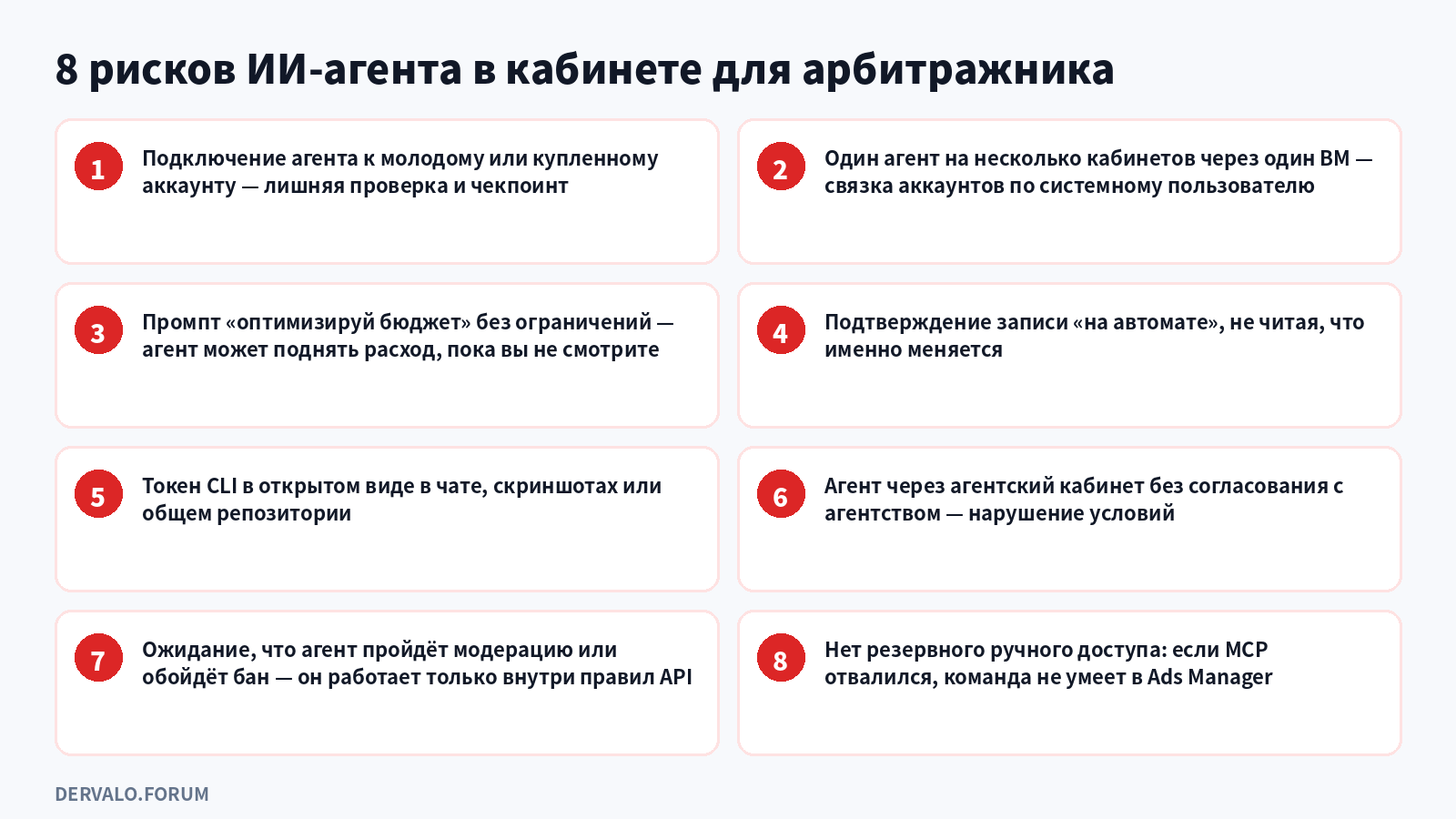
Checklist before connecting an agent to a live account (Russian) · click to enlarge
- A young or purchased account. Connecting an external agent is an extra check; on accounts without history it is one more reason for a checkpoint. Warm up first, agent second. How trust is built is in the ad account trust article.
- One agent on several accounts through one BM. A system user links accounts the same way a shared IP or fingerprint does. A separate BM and agent per account cluster, as with anti-detect profiles.
- A prompt without limits. "Optimize the budget" with no ceiling: the agent will propose raising spend and a tired buyer will confirm without looking. Always set limits in the prompt.
- Confirming on autopilot. The write confirmation is the only safeguard. Read what is actually changing.
- A CLI token in the open. In a chat, a screenshot, a shared repo: that is full account access. Store it like a payment password.
- An agency account without agreement. Connecting an external agent to an agency's account may violate its terms; ask the agency first. Agency accounts are covered in a separate breakdown.
- Expecting miracles. The agent does not pass moderation or lift bans; it does what you do in Ads Manager, only faster.
- No manual fallback. If MCP goes down or access is revoked, the team must be able to work by hand.
If you do not have MCP access
According to the first guides, access is not yet open to all accounts and rolls out first to verified BMs with history. While you wait: an agent through a browser extension (Claude in Chrome) can do the same tasks through the UI, but far slower and more expensive in tokens, and on young accounts it raises checkpoint risk. Classic auto-upload services work through their own API apps; their list with terms is in the auto-upload catalog. The campaign structure the agent will build is explained in the ABO, CBO and Advantage+ article.
FAQ: Meta Ads MCP and AI agents
What is Meta Ads MCP?
Meta's official MCP server at mcp.facebook.com/ads, through which AI agents such as Claude and ChatGPT access Ads Manager: reading statistics and, with user confirmation, creating and editing campaigns. Launched April 29, 2026 together with Meta Ads CLI.
Can an AI agent launch a campaign or raise a budget on its own?
No. Under Meta's rules any write action requires explicit user confirmation. The agent proposes, you confirm.
Is it safe for an ad account?
The tool itself is official and breaks no rules. The risks are in how it is used: connecting to young accounts, linking accounts through one BM, prompts without limits, leaked tokens. The risk checklist is above.
How do I connect Claude to Facebook Ads?
Settings → Connectors → add a custom connector with URL mcp.facebook.com/ads → authorize via Facebook → pick the Business Manager and accounts. No developer app needed.
How does MCP differ from auto-upload services?
MCP is Meta's official channel with confirmation of every write and no logic of its own; auto-uploaders are third-party services with their own API apps, templates and bulk operations without confirmations. MCP is safer for the account; auto-uploaders are faster for mass uploads.
I do not have MCP access. Why?
The rollout is gradual; by observation, priority goes to verified BMs with spend history and US/EU geos. Check periodically: if OAuth does not offer an account when adding the connector, access is not open yet.
Do I need the CLI if the Claude connector exists?
For manual work, no; the connector is simpler. The CLI is for scripts, cron jobs and terminal agents (Claude Code, Codex) where there is no chat.
Already connected an agent to your account? Share which tasks you covered and what you ran into in the Facebook section of the forum. Auto-upload services are in the catalog, where you can also leave a review.