An antidetect browser is the first thing a media buyer pays for after proxies — and the first thing beginners try to save on. The result is always the same: accounts get banned "by association" even though the creatives and the offer were fine. Here is what actually leaks in a browser fingerprint, which criteria matter when comparing antidetect browsers, and which of the 10 services fits solo Facebook farming, a team, TikTok or Google Ads — with prices taken from the official sites in September 2026.
What an antidetect browser is and why affiliates need one
An antidetect browser is a Chromium or Firefox build that spoofs the device fingerprint for every profile: User-Agent, Canvas, WebGL, fonts, AudioContext, screen resolution, time zone and a couple of dozen more parameters. To a website each profile looks like a separate computer owned by a separate person, not 40 tabs on one laptop.
Affiliates need it for three reasons:
- Multi-accounting. Facebook, TikTok and Google do not ban a "bad account"; they ban links between accounts. One shared fingerprint and the whole batch goes down after the first ad account is flagged. The causes are covered in "Facebook ad account banned: causes and what to do in the first 24 hours".
- Farming and warm-up. An account that "lives" for a week in the same profile with the same cookies, proxy and fingerprint builds trust. The mechanics are in our ad account trust guide.
- Teams. A buyer in Warsaw, a farmer in Tashkent and a team lead in Lisbon work on the same accounts without sending cookie files to each other in Telegram.
It is just as important to understand what an antidetect browser does not do: it does not protect you from bans for creatives, offers or behaviour. It is an isolation tool, not a get-out-of-jail card.
How fingerprinting works and what actually gives you away
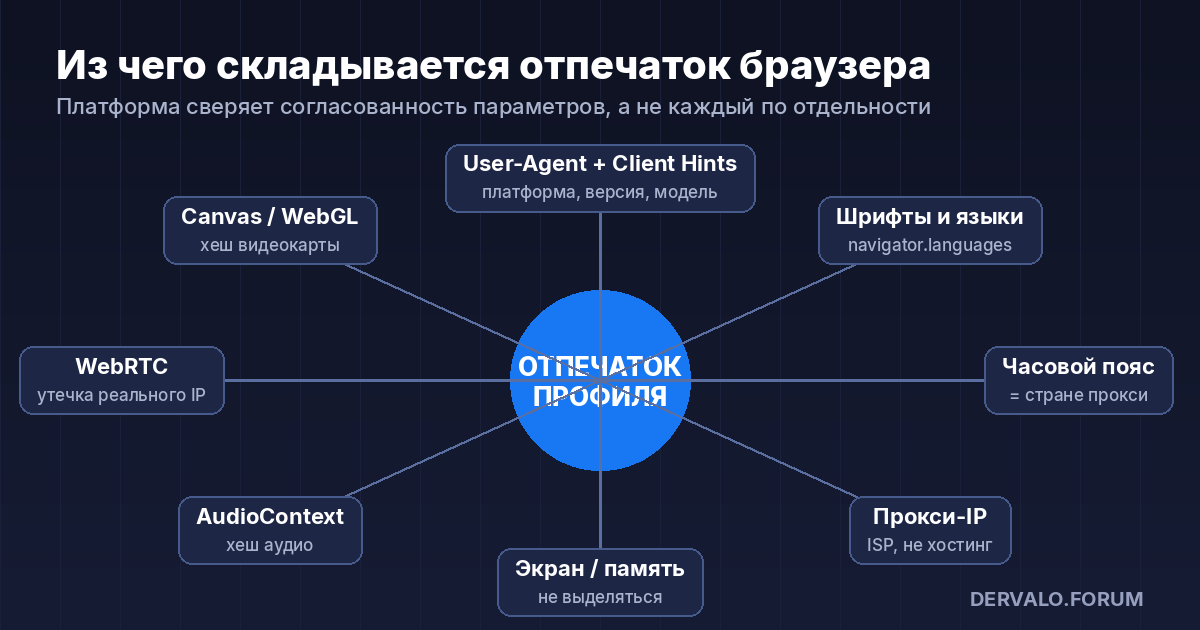
The platform collects the fingerprint via JavaScript on every page load. The key layers:
- Canvas and WebGL. The browser draws an invisible image; the result depends on the GPU and driver. The hash of that image is the most stable identifier. Cheap antidetects add random "noise" to Canvas, and that is a tell by itself: a real Chrome on a real GPU adds no noise.
- User-Agent and Client Hints. Since 2023 Chrome barely exposes the full UA but does expose
Sec-CH-UA-Platform, version, architecture and model. If the antidetect spoofed the UA to "Windows" while Client Hints say "macOS", that is a red flag. - Fonts, languages, time zone. A "German" profile on a German proxy with a Russian keyboard in
navigator.languagesand a UTC+3 time zone is a classic that gets accounts banned during farming. - WebRTC. Leaks the real IP around the proxy. Every service in the table below spoofs or disables WebRTC — but verify it yourself on any checker.
- AudioContext, screen, battery, memory. Secondary parameters that add up to "entropy". Their job is not to stand out: 8 GB RAM and 1920×1080 is normal; 128 GB and 5120×2880 for a "student from Brazil" is not.
Hence the main selection criterion: not "how many parameters it spoofs" but whether the antidetect takes fingerprints from real devices and keeps them consistent. This is exactly where cheap and expensive solutions diverge.
Criteria for comparing antidetect browsers
- Fingerprint source. A database of real devices (Octo, Dolphin, Vision, Multilogin, Kameleo) or a parameter generator.
- Price per profile. Not the plan price, but the cost of one profile at the volume you need. With 30 accounts, €29 for 30 profiles and $89 for 100 are different stories.
- Team features. Roles, profile transfer, activity log, how many seats are included and what an extra seat costs.
- Storage: cloud or local. Cloud is convenient for teams and moving between machines; local means no dependence on the vendor's servers.
- Automation. API, Puppeteer/Playwright/Selenium, built-in RPA and a "synchronizer" that repeats actions across windows.
- Mobile fingerprints. TikTok and some gambling offers need an Android/iOS profile, not a desktop one.
- Cookie robot. Automatic profile warm-up across a list of sites before logging into an ad account.
- Patch speed. When Meta changes its detection, the vendor must ship an update in days, not months.
- Payment. Card, crypto, local currencies — availability differs.
- Free plan. Not for production, but to check the fingerprint on checkers before paying.
Comparison of 10 antidetect browsers: prices and limits (September 2026)
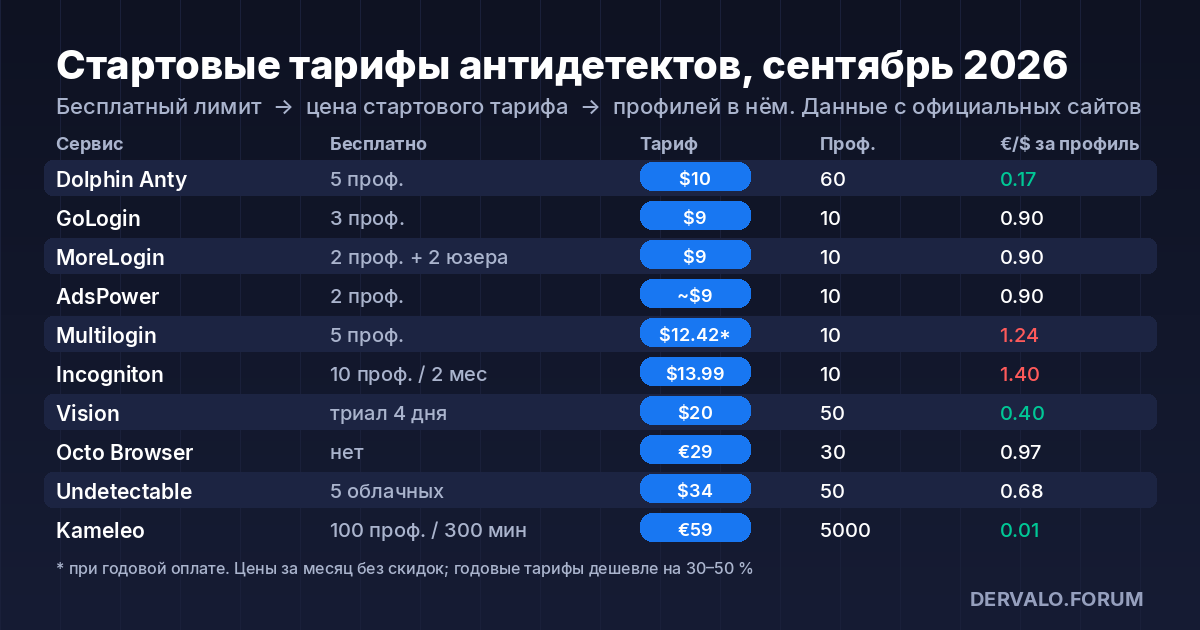
| Service | Free | Entry plan | Profiles | Team | OS | API / RPA |
|---|---|---|---|---|---|---|
| Dolphin Anty | 5 profiles | $10/mo (Starter) | 60 | +$10–25 per user on Base+ | Win, macOS, Linux | API, scenarios, synchronizer |
| Octo Browser | none (Lite €10 for 3 profiles) | €29/mo (Starter) | 30 | 6 seats on Team €169 | Win, macOS Intel/M, Linux | API from Base €79 |
| AdsPower | 2 profiles forever | from ~$9/mo (Pro) | 10–100 | roles and permissions | Win, macOS, Linux, Android, iOS | RPA + Local API 300–1500 RPM |
| Multilogin | 5 profiles | $12.42/mo billed yearly (Pro 10) | 10–50 | 1–2 seats, Business — unlimited | Win, macOS, Linux + cloud X | API, Cookie Robot, templates |
| GoLogin | 3 profiles + 7-day trial | $9/mo (Pro) | 10–100 | 1 seat | Win, macOS, Linux, Android, web | REST API 300–1200 RPM |
| Vision | 4-day trial | $20/mo (Micro) | 50 | +$9–15 per user | Win, macOS | synchronizer, Human Type |
| Undetectable | 5 cloud, local — 50 per month | $34/mo (Base) | 50 cloud / local ∞ | 2 users on Pro $69 | Win, macOS | Local API, Cookies bot |
| Incogniton | 10 profiles for 2 months, then 3 | $13.99/mo (Starter Plus) | 10 | 3 seats on Pro $55.99 | Win, macOS | API and Synchronizer from $20.99 |
| Kameleo | 100 cloud, 3 users, 300 min | €59/mo (Startup) | 5,000 | unlimited | Win, macOS, Docker | API, mobile profiles |
| MoreLogin | 2 profiles + 2 users forever | $9/mo (Pro) | 10 | as needed | Win, macOS, Linux | RPA, Local API, Cloud Phone |
Prices are for monthly billing without discounts; annual billing usually gives 30–50% off. All vendors change plans regularly — check the current terms on the cards in our antidetect browser catalog, where users also leave reviews.
Service by service: who each one is for
Dolphin Anty — the de facto standard for Facebook in the CIS
The most popular antidetect among Russian-speaking FB teams. Strengths: profile statuses and notes, bulk account import from Excel, a built-in scenario builder and a synchronizer that repeats clicks in all open windows. The free plan for 5 profiles has no API or cloud, but you can check the fingerprint. Starter at $10 for 60 profiles is the cheapest "volume" offer in the table. Downside: the plan with team features already costs $89, and every extra user is from $10.
Octo Browser — real fingerprints and fast patches
Octo takes fingerprints from real devices and keeps parameters consistent — exactly what the fingerprint section was about. That is why it is chosen for Google Ads and "expensive" accounts where losing one profile costs more than the subscription. The pricing grid is transparent: Starter €29 for 30 profiles, Base €79 for 200 with API, Team €169 for 600 profiles and 6 seats. There is no free plan; Lite at €10 for 3 profiles is effectively a paid trial. Cards and crypto accepted.
AdsPower — the Chinese giant with RPA
The largest antidetect in the world by user count. The main card is the RPA robot with ready-made templates: warm-up, likes, sign-ups without code. Plus Android and iOS apps. 2 free profiles forever. The site shows the exact Pro price only in its calculator — budget around $9 for the entry 10 profiles. The interface is cluttered and support is slower than CIS competitors.
Multilogin — the veteran with cloud version X
One of the oldest players, with its own Mimic (Chromium) and Stealthfox (Firefox) cores. In 2026 it bet on the cloud: Multilogin X, built-in residential proxies (1–5 GB included) and cloud mobile devices. Free — 5 profiles. Pro 10 costs $149 per year ($12.42/mo), Business from $320 per year for 100 profiles with unlimited seats. Suits teams that want "everything in one" and are not price-sensitive.
GoLogin — the cheapest entry with a web version
Orbita core, a free plan for 3 profiles, Pro from $9 for 10 profiles and a web version that runs a profile in the cloud from any device. There is an Android app. For a solo buyer with 10–25 accounts it is optimal on price. Limitation: every plan except Custom has one team seat, so teams have to buy extra.
Vision Browser — support and mobile fingerprints
A young service that wins on support: replies within minutes, direct contact with the developers. Inside: real fingerprints, Android profiles, 2FA code generation inside the profile, webcam spoofing and traffic caching that saves up to 80% of proxy bandwidth. Micro at $20 for 50 profiles is noticeably cheaper than Octo Starter at a similar volume. 4-day trial.
Undetectable — unlimited local profiles
The key feature: on any paid plan local profiles are unlimited, you only pay for cloud ones (50 on Base for $34). There is a bulk creation manager (up to 1,000 profiles in minutes), a Cookies bot for warm-up and a migration tool from other antidetects. The free plan is limited to 50 created profiles per month. A good fit for farmers who keep hundreds of accounts on one machine.
Incogniton — a cheap start for solo buyers
An Amsterdam-based service with 10 free profiles for two months (then 3). Starter Plus at $13.99 for 10 profiles, Entrepreneur at $20.99 for 50 with API and synchronizer. A useful touch: "paste as human typing". Team features start with Professional at $55.99 for 150 profiles and 3 seats. Windows and macOS, no Linux.
Kameleo — for mobile and automation
The only one on the list with full iOS/Android profile emulation and launching from a phone. The free plan is generous: 100 cloud profiles, 3 users, 2 mobile profiles, but limited to 300 minutes of browser time. Startup at €59 removes the limit and gives unlimited team members. Kameleo is chosen for TikTok and for setups that need Playwright/Selenium with a mobile fingerprint.
MoreLogin — free for two, forever
2 profiles and 2 users at no cost, Pro at $9 for 10 profiles, built-in RPA, team activity log and a cloud Android ("Cloud Phone" at $0.006/min). For a duo starting out it is the only fully free option with team access.
The other services in the catalog — Linken Sphere, Indigo, DICloak, AntBrowser, Accovod and more — are in the full antidetect list.
Which antidetect browser to choose for your task
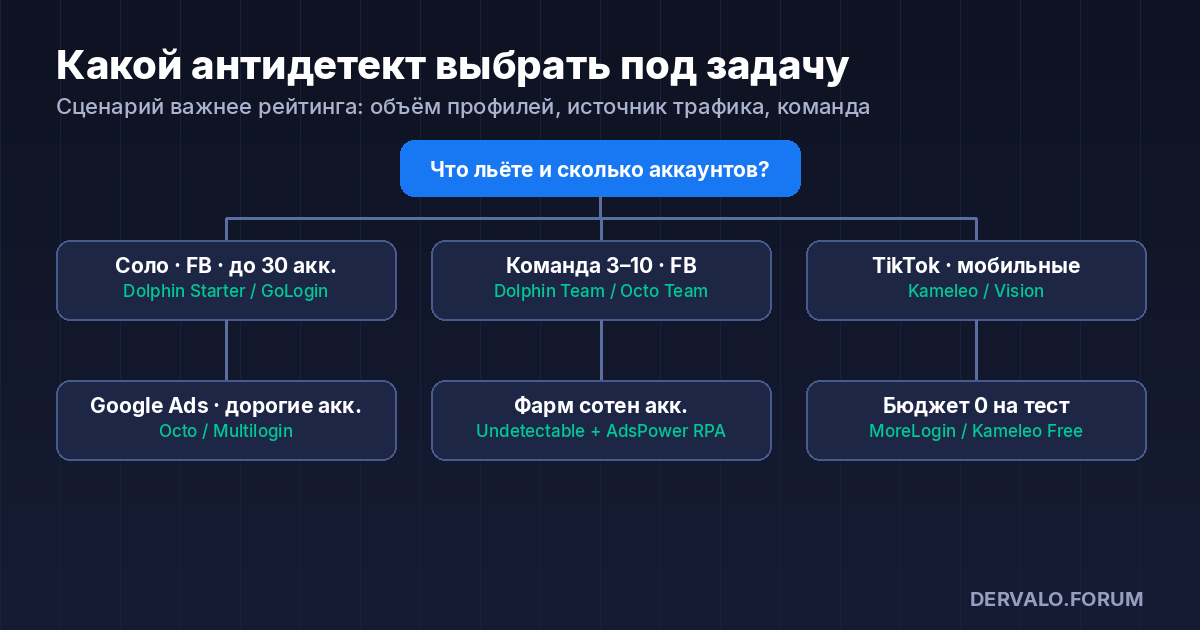
- Solo buyer, Facebook, up to 30 accounts. Dolphin Anty Starter ($10 for 60) or GoLogin Pro ($9 for 10). Start with Dolphin's free plan to check the fingerprint on checkers.
- Team of 3–10, Facebook + agency accounts. Dolphin Base/Team for statuses and the synchronizer, or Octo Team (€169, 6 seats, 600 profiles) for fingerprints and stability. Agency accounts and their risks are covered in a separate guide.
- TikTok and mobile offers. Kameleo or Vision for real Android profiles. How to run gambling on TikTok and what gets banned there — in the TikTok gambling guide.
- Google Ads, expensive accounts. Octo or Multilogin: the cost of a mistake exceeds the cost of the subscription. What to do about "Circumventing systems" — here.
- Farming hundreds of accounts on one machine. Undetectable (unlimited local) + AdsPower RPA for warm-up.
- Zero budget for a test. MoreLogin (2 profiles + 2 users forever) or Kameleo Free (100 profiles with a minutes cap).
Antidetect + proxies: where the setup breaks
An antidetect without proper proxies is useless. Three rules whose violation causes most bans:
- One profile — one IP. Mobile proxies with link rotation for farming, residential or ISP for running ads. Service and price comparison is in "Mobile proxies for Facebook farming".
- Proxy geo = profile geo. Time zone, language and Client Hints must match the IP country. Most antidetects pull them automatically from the proxy — make sure that option is on.
- Do not hop between antidetects with the same cookies. Moving a profile from one service to another changes the fingerprint under the same cookies — the platform sees "same person, different computer". Migrate only with a fresh warm-up.
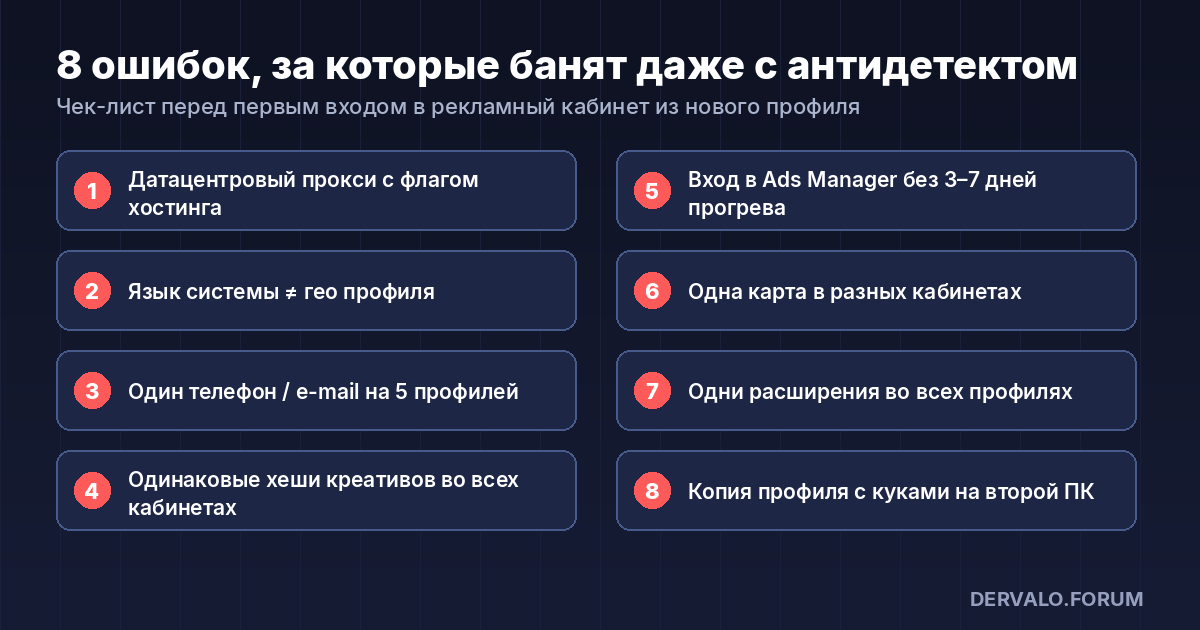
8 mistakes that get you banned even with an antidetect
- A Windows profile on a datacenter proxy flagged as hosting.
- Russian system language in a profile "from Poland".
- The same phone number / e-mail across five profiles.
- Uploading the same creatives with identical file hashes to every ad account — Meta compares media.
- Logging into Ads Manager from a fresh profile without 3–7 days of warm-up.
- The same payment card in different ad accounts without an agency setup.
- Browser extensions installed in every profile that become a fingerprint by themselves.
- Copying a profile with cookies to a second computer "as a backup".
If the account still goes down, do not delete the profile — you need it for the appeal. The procedure is described in the article on Facebook ad account bans.
FAQ: common questions about antidetect browsers
Which antidetect browser is best for Facebook in 2026?
For CIS teams — Dolphin Anty (auto-upload integrations, synchronizer, price). For expensive accounts and Google Ads — Octo Browser. There is no "best for everyone": choose by profile volume, team and traffic source.
Is there a free antidetect browser?
Yes: Dolphin Anty (5 profiles), Multilogin (5), GoLogin (3), AdsPower (2), MoreLogin (2 + 2 users), Kameleo (100 profiles but 300 minutes), Incogniton (10 for two months). Not enough for production, enough to check the fingerprint on checkers.
Octo Browser or Dolphin Anty — which to choose?
Dolphin is cheaper at volume (60 profiles for $10 vs 30 for €29) and more convenient for FB farming. Octo is more stable on fingerprints and patches faster. If you lose accounts "by association" on Dolphin, that is the first reason to try Octo.
Can I use an antidetect without proxies?
No. All profiles will exit from one IP and fingerprint spoofing will not save you. Minimum — one proxy per profile.
How is an antidetect different from incognito mode or separate Chrome profiles?
Incognito clears cookies but the device fingerprint stays the same. Chrome profiles separate cookies but Canvas, WebGL and hardware are identical. An antidetect spoofs the hardware itself.
How do I check that the antidetect works?
Open any public fingerprint checker inside the profile and verify: IP and time zone match the proxy country, WebRTC does not expose the real IP, Canvas is not flagged as "noise", Client Hints match the User-Agent.
Do I need an antidetect for TikTok Ads?
Yes, preferably with mobile fingerprints (Kameleo, Vision, AdsPower). TikTok checks the device more aggressively than Facebook, and in 2026 a desktop profile alone looks suspicious for new ad accounts.
Using one of these? Leave a review on the service card in the catalog — ratings there come only from forum users. Questions about farming and accounts go to the "Accounts" section, questions about running ads to the Facebook thread.