
Redirecting traffic from TikTok to Telegram is the core way to monetize UBT (free traffic): videos collect free views in the For You feed, and you earn in Telegram, where links are not restricted and you can warm up your audience. In this guide we explain how to move traffic from TikTok to Telegram without bans: how to add a Telegram link to your TikTok bio, what to do without 1,000 followers, which bridge pages to use, how to track each account and where to send people next.
What TikTok to Telegram traffic redirection is
Traffic redirection means moving an audience from one platform to another. In a TikTok → Telegram setup, reach comes for free from the recommendation algorithm, and Telegram is where subscribers turn into money through affiliate offers, channel ads or your own products.
Why Telegram:
- You own the audience. If the TikTok account gets banned, channel subscribers stay.
- No link restrictions. Posts and bots can include any link, promo code or button.
- Funnel tools: channels, groups, bots with auto-funnels and Mini Apps that open inside Telegram.
- Easy tracking. Invite links and bot parameters show which account and video brought people in.
This is UBT traffic. Read more about the approach, verticals and GEOs in our article on UBT traffic from TikTok.
The funnel: how traffic turns into money
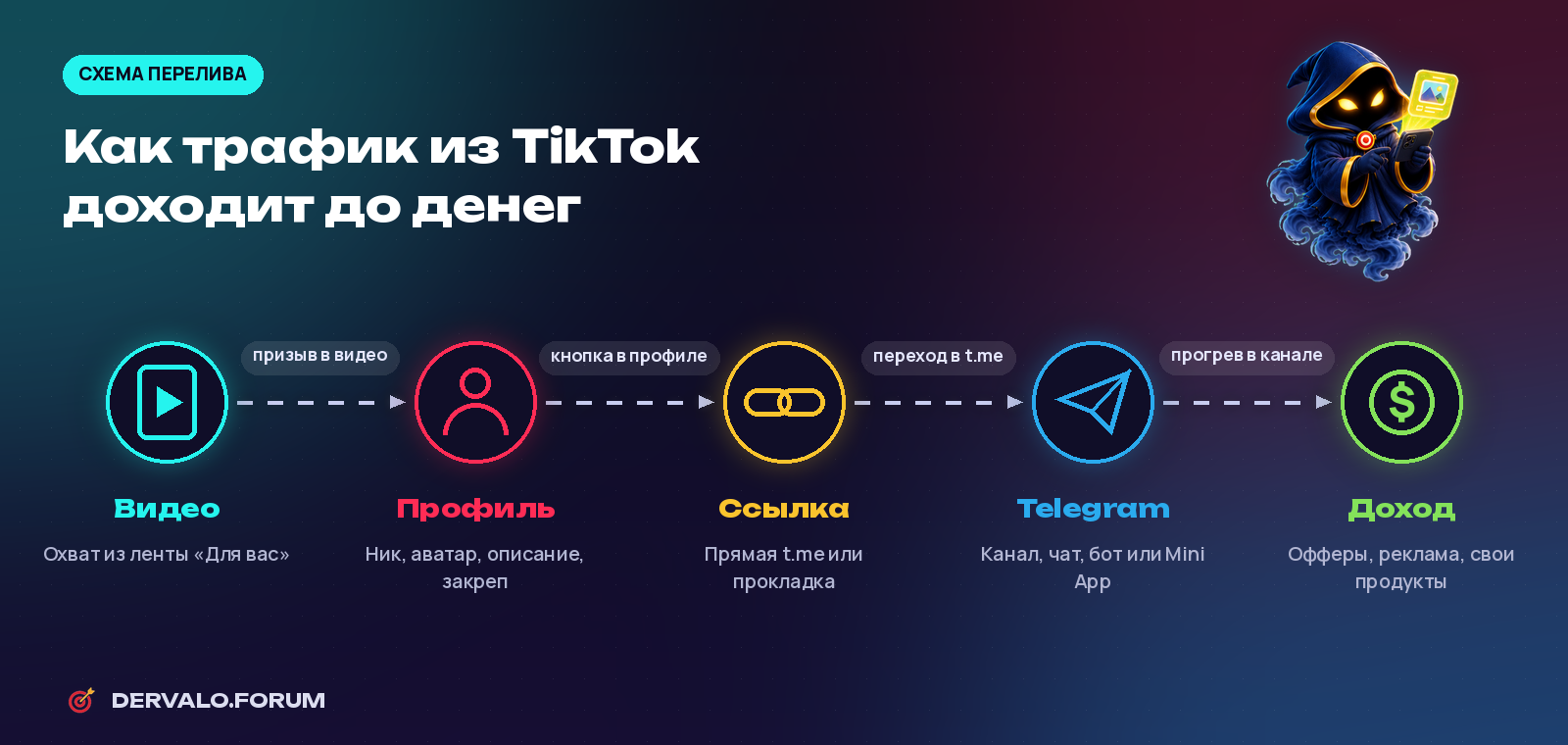
The funnel: video → profile → link → Telegram → monetization
- Video gets views in the For You feed: creatives, a strong hook and regular posting.
- Profile. Interested viewers open the profile; the name, avatar and bio should explain what they get in Telegram.
- Link. The Website button leads to t.me or to a bridge page.
- Telegram. A channel, group, bot or Mini App welcomes and keeps the user.
- Monetization. A warmed-up audience clicks offers, buys your products or sees ads.
How to add a Telegram link to your TikTok bio
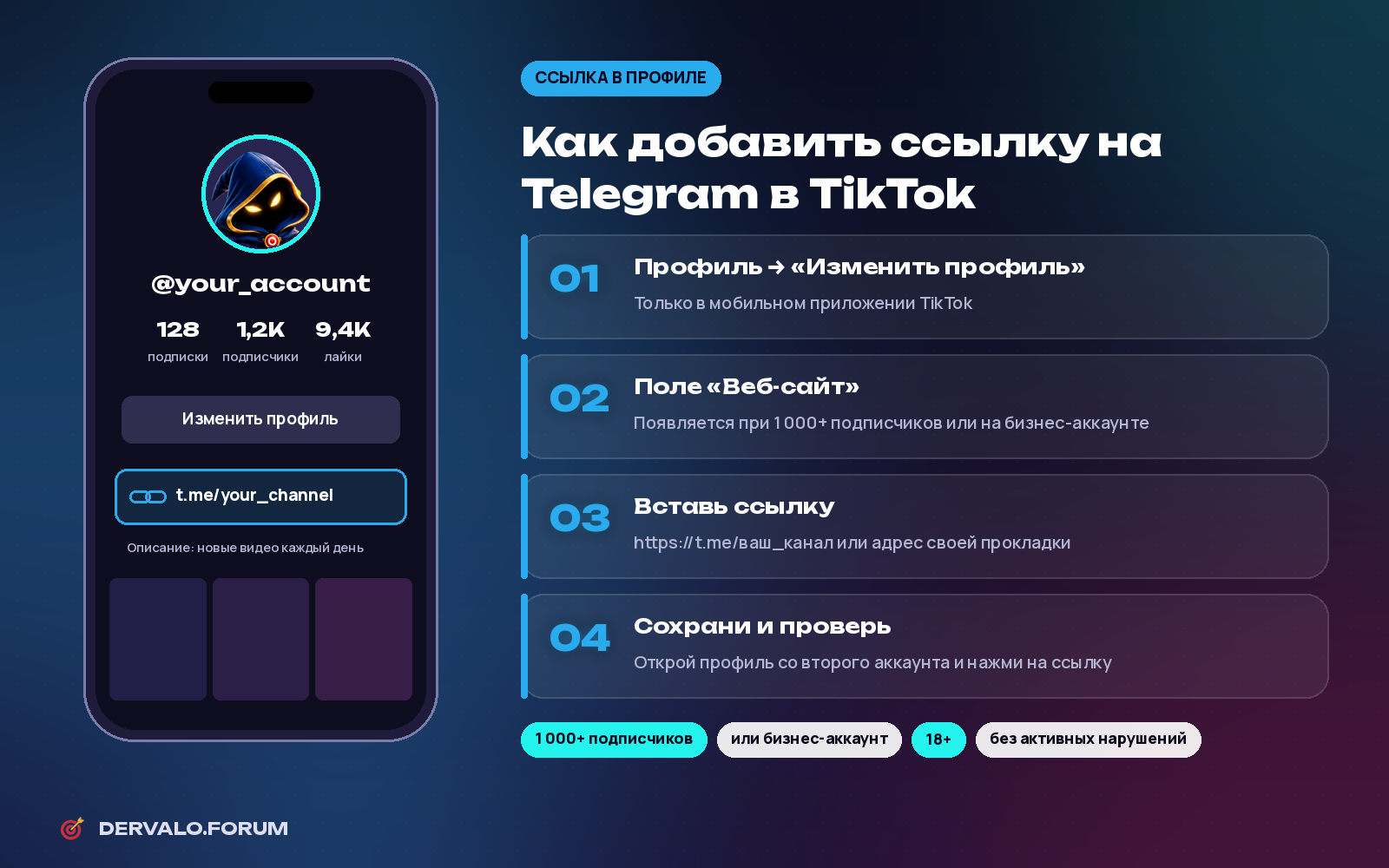
Telegram link in a TikTok profile: the Website field and its requirements
- Open the TikTok mobile app; the link field is usually not available on the web.
- Go to Profile → Edit profile.
- Find the Website field and paste
https://t.me/your_channelor your bridge page URL. - Save and test the button from a second account.
Why the link button is missing
- Under 1,000 followers on a personal account. The Website field usually unlocks at about 1,000 followers.
- Age. The account holder must be 18+.
- Violations. Active Community Guidelines violations can block the feature.
- Link pasted into the bio text. Only the separate Website field is clickable.
- Cache or an old app version. Update and restart the app.
TikTok link in bio without 1,000 followers
Switch to a Business account: Settings and privacy → Account → Switch to Business Account. It is free and reversible. Many business accounts get the Website field right away, but the conditions vary by region. If it still does not appear, use non-clickable options: the channel name in your display name, bio and pinned comment.
7 ways to redirect TikTok traffic
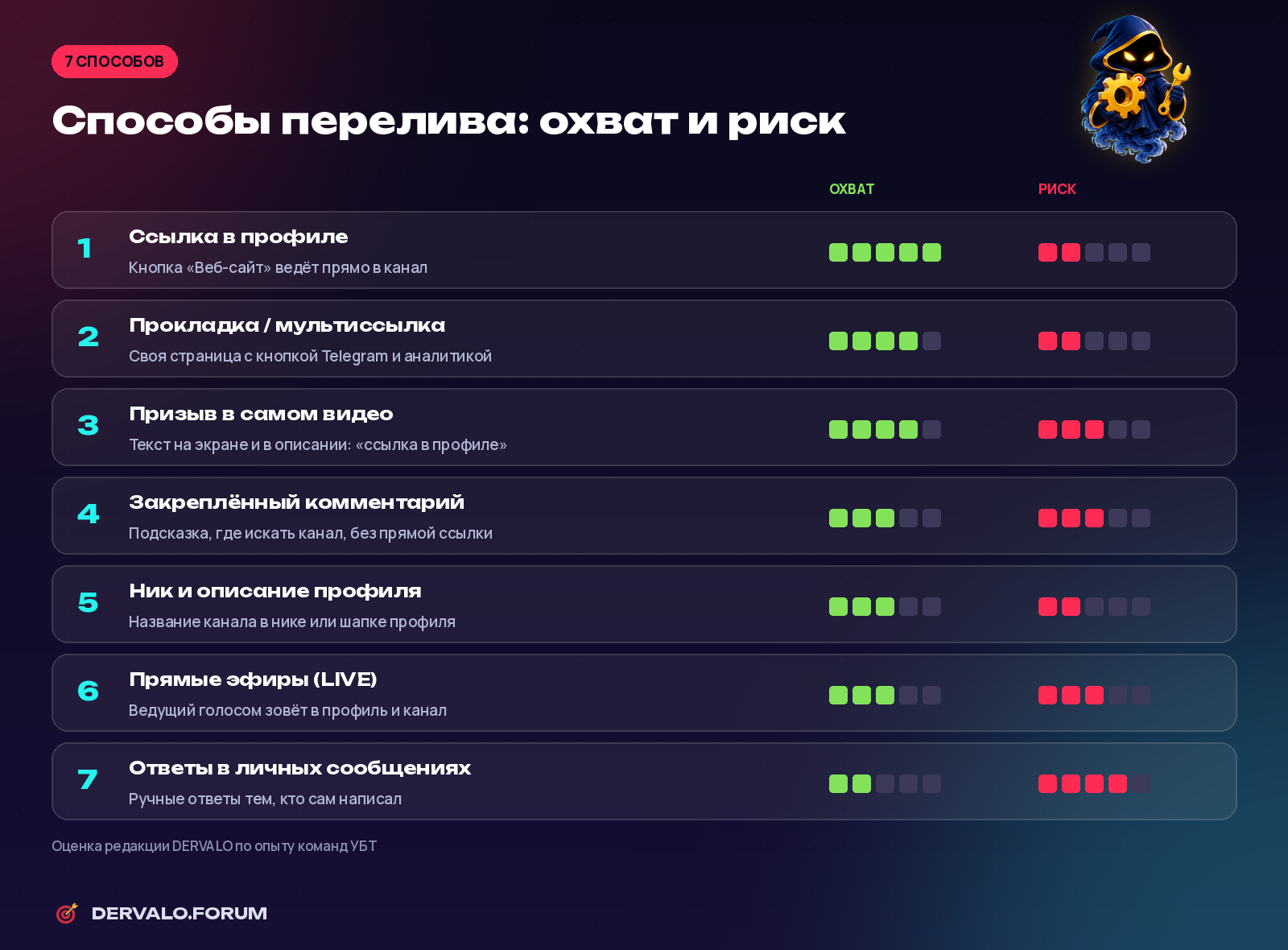
Redirection methods: reach and risk (DERVALO editorial rating)
- Bio link — the main channel, one tap from video to Telegram.
- Bridge page or link-in-bio tool — analytics and the ability to change the final link without editing profiles.
- Call to action in the video — short on-screen text such as "link in bio"; keep it soft, since TikTok limits spammy content.
- Pinned comment — a hint on where to find the channel; direct links in comments are usually not clickable.
- Display name and bio — the channel name helps before the link button unlocks.
- LIVE — the host invites viewers to the profile; LIVE requires 18+ and usually a follower threshold.
- Direct messages — only manual replies to people who wrote first; mass DMs lead to restrictions.
Bridge pages for TikTok
| Type | Pros | Cons |
|---|---|---|
| Link-in-bio tool (Taplink, Linktree, etc.) | Live in 5 minutes, no code | Shared domain, less control and analytics |
| Your own landing page | Full control, pixels, UTM, custom design | Needs a domain, hosting and a clean domain reputation |
| Direct bot link | Tracks the source via the start parameter | Some users drop off at bots |
| Telegram Mini App | Opens inside Telegram like an app | Requires development and support |
Use a domain with a clean history and avoid disposable URL shorteners, which spammers use and which get blocked more often.
How to track each account
- Separate invite links. Channel admins can create multiple named invite links with expiry and limits, and Telegram shows how many people joined through each. One link = one TikTok account.
- Bot start parameter.
t.me/bot_name?start=tt_acc12passes a source tag to the bot (up to 64 characters: A–Z, a–z, 0–9, _ and -). - Mini App startapp parameter.
t.me/bot_name/app?startapp=tagworks the same way for Mini Apps. - UTM tags on the bridge page to see clicks in analytics.
Where to send traffic and how to monetize it
- Telegram channel — content, warm-up and offers in posts. You can grow it further with paid shoutouts.
- Bot with an auto-funnel — welcome message, a sequence and an offer; good for gambling, betting and crypto.
- Mini App — a game, quiz or storefront inside Telegram; see our article on Telegram Mini Apps.
- Group chat — builds trust but needs moderation.
Compare affiliate programs with CPA, RevShare and hybrid payouts in the DERVALO affiliate program catalog.
How to redirect traffic without getting banned
Since the Community Guidelines update effective 13 September 2025, TikTok reduces the reach of content that sends people to buy off-platform. Spam, fake engagement and identical videos across many accounts also lead to restrictions.
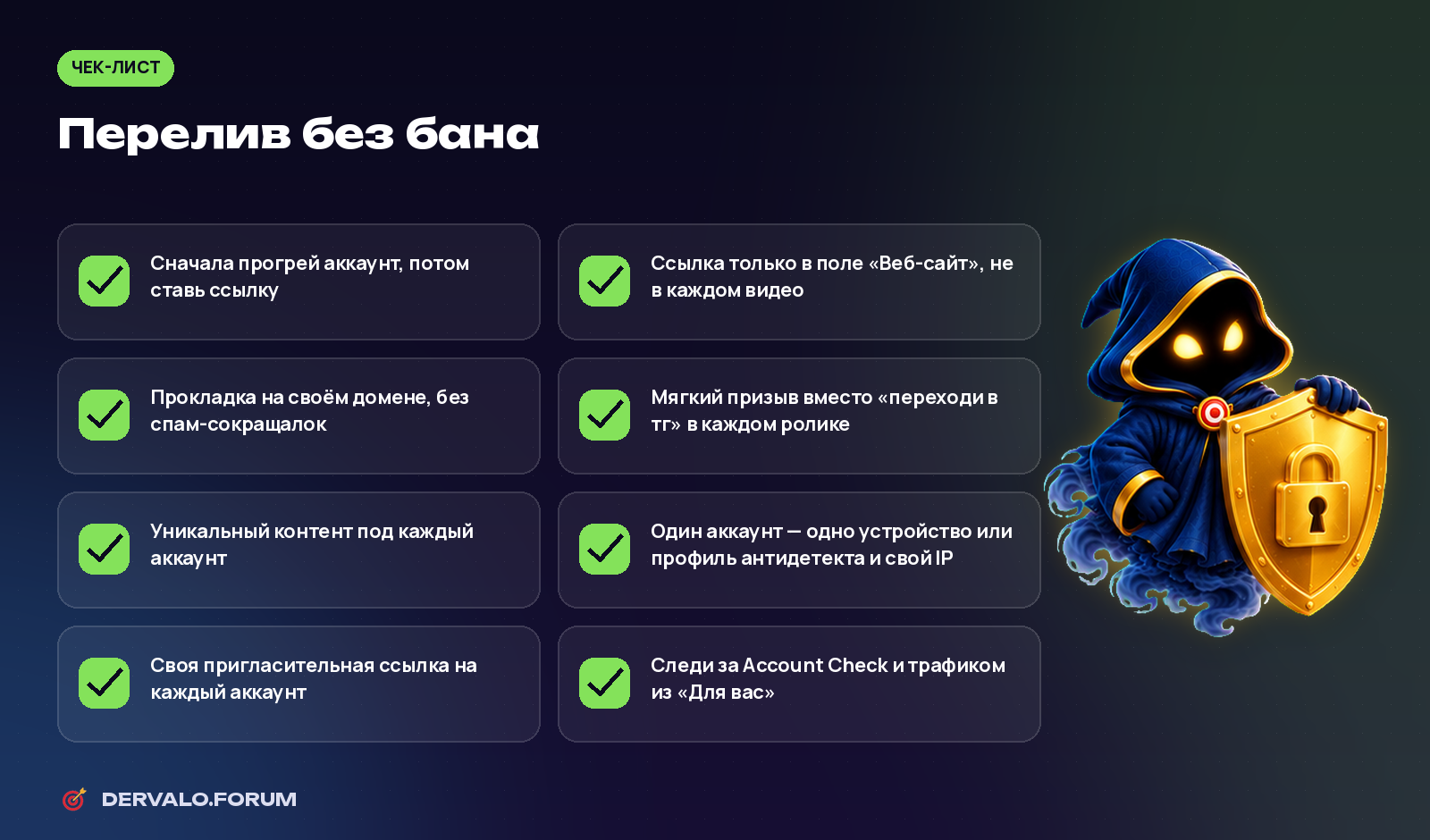
Checklist: redirection without bans
- Warm up the account first, then add the link.
- Link only in the Website field, not in every video.
- Soft call to action: "more in bio" is safer than "go to Telegram" in every clip.
- Unique content for each account.
- Account isolation: one device or antidetect browser profile and its own IP per account, with mobile proxies from the same GEO.
- Monitor status in Account Check and your For You traffic share; if views drop, read our guide to the TikTok shadowban.
Common mistakes
- Adding a link to a brand-new account and posting CTAs from day one.
- One link for all accounts, so you cannot tell which one works.
- An empty channel: fill it with content before sending traffic.
- A mismatch between the video promise and the channel topic.
- Weak creatives: no views, no redirection. See our guide to creatives for affiliate marketing.
FAQ
How do I add a Telegram link to TikTok?
Profile → Edit profile → Website. Paste https://t.me/your_channel and save. The field is available with 1,000+ followers on a personal account or on a business account.
Can I add a link without 1,000 followers?
Often yes, by switching to a business account. Otherwise put the channel name in your display name, bio and pinned comment.
Does TikTok ban Telegram links?
A Telegram link in the Website field is allowed. Restrictions usually come from spam, duplicate content, fake engagement and aggressive calls to leave the platform.
What is a bridge page for TikTok?
An intermediate page between TikTok and Telegram, such as a link-in-bio tool or your own landing page, which adds analytics and lets you change the final link.
How do I know which account brings subscribers?
Create a separate invite link per account or use the start parameter in your bot link.
Channel or bot?
A channel is simpler and retains the audience better; a bot is better for auto-funnels and precise source tracking. Many teams use both.
How many accounts do I need?
Start with a few to test creatives and the funnel, then scale once you have per-account tracking.
Does TikTok to Telegram work for gambling?
Yes, it is one of the most popular UBT verticals, but gambling ads are prohibited on TikTok, so videos must not advertise casinos directly and the offer is shown in Telegram. Also follow the laws of your target GEO.
Running TikTok to Telegram? Share your setup on the forum in the TikTok and UBT section.